Vue3 组件通信方式
- props
- $emit
- expose / ref
- $attrs
- v-model
- provide / inject
- Vuex
- mitt
Vue3 通信使用写法
1. props
用 props 传数据给子组件有两种方法,如下
方法一,setup() 方法写法
// Parent.vue 传送
<child :msg1="msg1" :msg2="msg2"></child>
<script>
import child from "./child.vue"
import { ref, reactive } from "vue"
export default {
    data(){
        return {
            msg1:"这是传级子组件的信息1"
        }
    },
    setup(){
        // 创建一个响应式数据

        // 写法一 适用于基础类型  ref 还有其他用处,下面章节有介绍
        const msg2 = ref("这是传级子组件的信息2")

        // 写法二 适用于复杂类型,如数组、对象
        const msg2 = reactive(["这是传级子组件的信息2"])

        return {
            msg2
        }
    }
}
</script>

// Child.vue 接收
<script>
export default {
  props: ["msg1", "msg2"],// 如果这行不写,下面就接收不到
  setup(props) {
    console.log(props) // { msg1:"这是传给子组件的信息1", msg2:"这是传给子组件的信息2" }
  },
}
</script>
方法二,setup 语法糖
// Parent.vue 传送
<child :msg2="msg2"></child>
<script setup>
    import child from "./child.vue"
    import { ref, reactive } from "vue"
    const msg2 = ref("这是传给子组件的信息2")
    // 或者复杂类型
    const msg2 = reactive(["这是传级子组件的信息2"])
</script>

// Child.vue 接收
<script setup>
    // 不需要引入 直接使用
    // import { defineProps } from "vue"
    const props = defineProps({
        // 写法一
        msg2: String
        // 写法二
        msg2:{
            type:String,
            default:""
        }
    })
    console.log(props) // { msg2:"这是传级子组件的信息2" }
</script>
注意:
如果父组件是setup(),子组件setup 语法糖写法的话,是接收不到父组件里 data 的属性,只能接收到父组件里 setup 函数里传的属性
如果父组件是setup 语法糖写法,子组件setup()方法写法,可以通过 props 接收到 data 和 setup 函数里的属性,但是子组件要是在 setup 里接收,同样只能接收到父组件中 setup 函数里的属性,接收不到 data 里的属性
官方也说了,既然用了 3,就不要写 2 了,所以不推荐setup()方法写法。下面的例子,一律只用语法糖的写法
2. $emit
// Child.vue 派发
<template>
    // 写法一
    <button @click="emit('myClick')">按钮</buttom>
    // 写法二
    <button @click="handleClick">按钮</buttom>
</template>
<script setup>

    // 方法一 适用于Vue3.2版本 不需要引入
    // import { defineEmits } from "vue"
    // 对应写法一
    const emit = defineEmits(["myClick","myClick2"])
    // 对应写法二
    const handleClick = ()=>{
        emit("myClick", "这是发送给父组件的信息")
    }

    // 方法二 不适用于 Vue3.2版本,该版本 useContext()已废弃
    import { useContext } from "vue"
    const { emit } = useContext()
    const handleClick = ()=>{
        emit("myClick", "这是发送给父组件的信息")
    }
</script>

// Parent.vue 响应
<template>
    <child @myClick="onMyClick"></child>
</template>
<script setup>
    import child from "./child.vue"
    const onMyClick = (msg) => {
        console.log(msg) // 这是父组件收到的信息
    }
</script>
3. expose / ref
父组件获取子组件的属性或者调用子组件方法
// Child.vue
<script setup>
    // 方法一 不适用于Vue3.2版本,该版本 useContext()已废弃
    import { useContext } from "vue"
    const ctx = useContext()
    // 对外暴露属性方法等都可以
    ctx.expose({
        childName: "这是子组件的属性",
        someMethod(){
            console.log("这是子组件的方法")
        }
    })

    // 方法二 适用于Vue3.2版本, 不需要引入
    // import { defineExpose } from "vue"
    defineExpose({
        childName: "这是子组件的属性",
        someMethod(){
            console.log("这是子组件的方法")
        }
    })
</script>

// Parent.vue  注意 ref="comp"
<template>
    <child ref="comp"></child>
    <button @click="handlerClick">按钮</button>
</template>
<script setup>
    import child from "./child.vue"
    import { ref } from "vue"
    const comp = ref(null)
    const handlerClick = () => {
        console.log(comp.value.childName) // 获取子组件对外暴露的属性
        comp.value.someMethod() // 调用子组件对外暴露的方法
    }
</script>
4. attrs
attrs:包含父作用域里除 class 和 style 除外的非 props 属性集合
// Parent.vue 传送
<child :msg1="msg1" :msg2="msg2" title="3333"></child>
<script setup>
    import child from "./child.vue"
    import { ref, reactive } from "vue"
    const msg1 = ref("1111")
    const msg2 = ref("2222")
</script>

// Child.vue 接收
<script setup>
    import { defineProps, useContext, useAttrs } from "vue"
    // 3.2版本不需要引入 defineProps,直接用
    const props = defineProps({
        msg1: String
    })
    // 方法一 不适用于 Vue3.2版本,该版本 useContext()已废弃
    const ctx = useContext()
    // 如果没有用 props 接收 msg1 的话就是 { msg1: "1111", msg2:"2222", title: "3333" }
    console.log(ctx.attrs) // { msg2:"2222", title: "3333" }

    // 方法二 适用于 Vue3.2版本
    const attrs = useAttrs()
    console.log(attrs) // { msg2:"2222", title: "3333" }
</script>
5. v-model
可以支持多个数据双向绑定
// Parent.vue
<child v-model:key="key" v-model:value="value"></child>
<script setup>
    import child from "./child.vue"
    import { ref, reactive } from "vue"
    const key = ref("1111")
    const value = ref("2222")
</script>

// Child.vue
<template>
    <button @click="handlerClick">按钮</button>
</template>
<script setup>

    // 方法一  不适用于 Vue3.2版本,该版本 useContext()已废弃
    import { useContext } from "vue"
    const { emit } = useContext()

    // 方法二 适用于 Vue3.2版本,不需要引入
    // import { defineEmits } from "vue"
    const emit = defineEmits(["key","value"])

    // 用法
    const handlerClick = () => {
        emit("update:key", "新的key")
        emit("update:value", "新的value")
    }
</script>
6. provide / inject
provide / inject 为依赖注入
provide:可以让我们指定想要提供给后代组件的数据或
inject:在任何后代组件中接收想要添加在这个组件上的数据,不管组件嵌套多深都可以直接拿来用
// Parent.vue
<script setup>
    import { provide } from "vue"
    provide("name", "沐华")
</script>

// Child.vue
<script setup>
    import { inject } from "vue"
    const name = inject("name")
    console.log(name) // 沐华
</script>
7. Vuex/Pinia
以 Vuex 为例,使用方法如下:
// store/index.js
import { createStore } from "vuex"
export default createStore({
    state:{ count: 1 },
    getters:{
        getCount: state => state.count
    },
    mutations:{
        add(state){
            state.count++
        }
    }
})

// main.js
import { createApp } from "vue"
import App from "./App.vue"
import store from "./store"
createApp(App).use(store).mount("#app")

// Page.vue
// 方法一 直接使用
<template>
    <div>{{ $store.state.count }}</div>
    <button @click="$store.commit('add')">按钮</button>
</template>

// 方法二 获取
<script setup>
    import { useStore, computed } from "vuex"
    const store = useStore()
    console.log(store.state.count) // 1

    const count = computed(()=>store.state.count) // 响应式,会随着vuex数据改变而改变
    console.log(count) // 1
</script>
8. mitt
Vue3 中没有了 EventBus 跨组件通信,但是现在有了一个替代的方案 mitt.js,原理还是 EventBus
先安装 npm i mitt -S
然后像以前封装 bus 一样,封装一下
import mitt from 'mitt'
const mitt = mitt()
export default mitt
然后两个组件之间通信的使用
// 组件 A
<script setup>
import mitt from './mitt'
const handleClick = () => {
    mitt.emit('handleChange')
}
</script>

// 组件 B
<script setup>
import mitt from './mitt'
import { onUnmounted } from 'vue'
const someMethed = () => { ... }
mitt.on('handleChange',someMethed)
onUnmounted(()=>{
    mitt.off('handleChange',someMethed)
})
</script>
Vue2.x 组件通信方式
Vue2.x 组件通信共有12种
- props
- $emit / v-on
- .sync
- v-model
- ref
- $children / $parent
- $attrs / $listeners
- provide / inject
- EventBus
- Vuex
- $root
- slot
父子组件通信可以用:
- props
- $emit / v-on
- $attrs / $listeners
- ref
- .sync
- v-model
- $children / $parent
兄弟组件通信可以用:
- EventBus
- Vuex
- $parent
跨层级组件通信可以用:
- provide/inject
- EventBus
- Vuex
- $attrs / $listeners
- $root
Vue2.x 通信使用写法
下面把每一种组件通信方式的写法一一列出
1. props
父组件向子组件传送数据,这应该是最常用的方式了
子组件接收到数据之后,不能直接修改父组件的数据。会报错,所以当父组件重新渲染时,数据会被覆盖。如果子组件内要修改的话推荐使用 computed
// Parent.vue 传送
<template>
    <child :msg="msg"></child>
</template>

// Child.vue 接收
export default {
  // 写法一 用数组接收
  props:['msg'],
  // 写法二 用对象接收,可以限定接收的数据类型、设置默认值、验证等
  props:{
      msg:{
          type:String,
          default:'这是默认数据'
      }
  },
  mounted(){
      console.log(this.msg)
  },
}
2. .sync
可以帮我们实现父组件向子组件传递的数据 的双向绑定,所以子组件接收到数据后可以直接修改,并且会同时修改父组件的数据
// Parent.vue
<template>
    <child :page.sync="page"></child>
</template>
<script>
export default {
    data(){
        return {
            page:1
        }
    }
}

// Child.vue
export default {
    props:["page"],
    computed(){
        // 当我们在子组件里修改 currentPage 时,父组件的 page 也会随之改变
        currentPage {
            get(){
                return this.page
            },
            set(newVal){
                this.$emit("update:page", newVal)
            }
        }
    }
}
</script>
3. v-model
和 .sync 类似,可以实现将父组件传给子组件的数据为双向绑定,子组件通过 $emit 修改父组件的数据
// Parent.vue
<template>
    <child v-model="value"></child>
</template>
<script>
export default {
    data(){
        return {
            value:1
        }
    }
}

// Child.vue
<template>
    <input :value="value" @input="handlerChange">
</template>
export default {
    props:["value"],
    // 可以修改事件名,默认为 input
    model:{
        // prop:'value', // 上面传的是value这里可以不写,如果属性名不是value就要写
        event:"updateValue"
    },
    methods:{
        handlerChange(e){
            this.$emit("input", e.target.value)
            // 如果有上面的重命名就是这样
            this.$emit("updateValue", e.target.value)
        }
    }
}
</script>
4. ref
ref 如果在普通的DOM元素上,引用指向的就是该DOM元素;
如果在子组件上,引用的指向就是子组件实例,然后父组件就可以通过 ref 主动获取子组件的属性或者调用子组件的方法
// Child.vue
export default {
    data(){
        return {
            name:"沐华"
        }
    },
    methods:{
        someMethod(msg){
            console.log(msg)
        }
    }
}

// Parent.vue
<template>
    <child ref="child"></child>
</template>
<script>
export default {
    mounted(){
        const child = this.$refs.child
        console.log(child.name) // 沐华
        child.someMethod("调用了子组件的方法")
    }
}
</script>
5. $emit / v-on
子组件通过派发事件的方式给父组件数据,或者触发父组件更新等操作
// Child.vue 派发
export default {
  data(){
      return { msg: "这是发给父组件的信息" }
  },
  methods: {
      handleClick(){
          this.$emit("sendMsg",this.msg)
      }
  },
}
// Parent.vue 响应
<template>
    <child v-on:sendMsg="getChildMsg"></child>
    // 或 简写
    <child @sendMsg="getChildMsg"></child>
</template>

export default {
    methods:{
        getChildMsg(msg){
            console.log(msg) // 这是父组件接收到的消息
        }
    }
}
6. $attrs / $listeners
多层嵌套组件传递数据时,如果只是传递数据,而不做中间处理的话就可以用这个,比如父组件向孙子组件传递数据时
$attrs:包含父作用域里除 class 和 style 除外的非 props 属性集合。通过 this.$attrs 获取父作用域中所有符合条件的属性集合,然后还要继续传给子组件内部的其他组件,就可以通过 v-bind="$attrs"
$listeners:包含父作用域里 .native 除外的监听事件集合。如果还要继续传给子组件内部的其他组件,就可以通过 v-on="$linteners"
使用方式是相同的
// Parent.vue
<template>
    <child :name="name" title="1111" ></child>
</template
export default{
    data(){
        return {
            name:"沐华"
        }
    }
}

// Child.vue
<template>
    // 继续传给孙子组件
    <sun-child v-bind="$attrs"></sun-child>
</template>
export default{
    props:["name"], // 这里可以接收,也可以不接收
    mounted(){
        // 如果props接收了name 就是 { title:1111 },否则就是{ name:"沐华", title:1111 }
        console.log(this.$attrs)
    }
}
7. $children / $parent
$children:获取到一个包含所有子组件(不包含孙子组件)的 VueComponent 对象数组,可以直接拿到子组件中所有数据和方法等
$parent:获取到一个父节点的 VueComponent 对象,同样包含父节点中所有数据和方法等
// Parent.vue
export default{
    mounted(){
        this.$children[0].someMethod() // 调用第一个子组件的方法
        this.$children[0].name // 获取第一个子组件中的属性
    }
}

// Child.vue
export default{
    mounted(){
        this.$parent.someMethod() // 调用父组件的方法
        this.$parent.name // 获取父组件中的属性
    }
}
8. provide / inject
provide / inject 为依赖注入,说是不推荐直接用于应用程序代码中,但是在一些插件或组件库里却是被常用,所以我觉得用也没啥,还挺好用的
provide:可以让我们指定想要提供给后代组件的数据或方法
inject:在任何后代组件中接收想要添加在这个组件上的数据或方法,不管组件嵌套多深都可以直接拿来用
要注意的是 provide 和 inject 传递的数据不是响应式的,也就是说用 inject 接收来数据后,provide 里的数据改变了,后代组件中的数据不会改变,除非传入的就是一个可监听的对象
所以建议还是传递一些常量或者方法
// 父组件
export default{
    // 方法一 不能获取 this.xxx,只能传写死的
    provide:{
        name:"沐华",
    },
    // 方法二 可以获取 this.xxx
    provide(){
        return {
            name:"沐华",
            msg: this.msg // data 中的属性
            someMethod:this.someMethod // methods 中的方法
        }
    },
    methods:{
        someMethod(){
            console.log("这是注入的方法")
        }
    }
}

// 后代组件
export default{
    inject:["name","msg","someMethod"],
    mounted(){
        console.log(this.msg) // 这里拿到的属性不是响应式的,如果需要拿到最新的,可以在下面的方法中返回
        this.someMethod()
    }
}
9. EventBus
EventBus 是中央事件总线,不管是父子组件,兄弟组件,跨层级组件等都可以使用它完成通信操作
定义方式有三种
// 方法一
// 抽离成一个单独的 js 文件 Bus.js ,然后在需要的地方引入
// Bus.js
import Vue from "vue"
export default new Vue()

// 方法二 直接挂载到全局
// main.js
import Vue from "vue"
Vue.prototype.$bus = new Vue()

// 方法三 注入到 Vue 根对象上
// main.js
import Vue from "vue"
new Vue({
    el:"#app",
    data:{
        Bus: new Vue()
    }
})
使用如下,以方法一按需引入为例
// 在需要向外部发送自定义事件的组件内
<template>
    <button @click="handlerClick">按钮</button>
</template>
import Bus from "./Bus.js"
export default{
    methods:{
        handlerClick(){
            // 自定义事件名 sendMsg
            Bus.$emit("sendMsg", "这是要向外部发送的数据")
        }
    }
}

// 在需要接收外部事件的组件内
import Bus from "./Bus.js"
export default{
    mounted(){
        // 监听事件的触发
        Bus.$on("sendMsg", data => {
            console.log("这是接收到的数据:", data)
        })
    },
    beforeDestroy(){
        // 取消监听
        Bus.$off("sendMsg")
    }
}
10. Vuex
Vuex 是状态管理器,集中式存储管理所有组件的状态。这一块内容过长,如果基础不熟的话可以看这个Vuex,然后大致用法如下
比如创建这样的文件结构
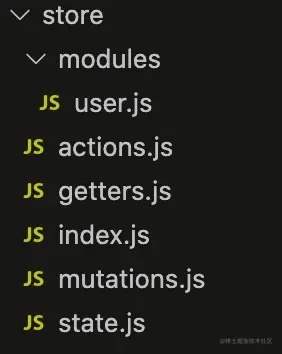
index.js 里内容如下
import Vue from 'vue'
import Vuex from 'vuex'
import getters from './getters'
import actions from './actions'
import mutations from './mutations'
import state from './state'
import user from './modules/user'

Vue.use(Vuex)

const store = new Vuex.Store({
  modules: {
    user
  },
  getters,
  actions,
  mutations,
  state
})
export default store
然后在 main.js 引入
import Vue from "vue"
import store from "./store"
new Vue({
    el:"#app",
    store,
    render: h => h(App)
})
然后在需要的使用组件里
import { mapGetters, mapMutations } from "vuex"
export default{
    computed:{
        // 方式一 然后通过 this.属性名就可以用了
        ...mapGetters(["引入getters.js里属性1","属性2"])
        // 方式二
        ...mapGetters("user", ["user模块里的属性1","属性2"])
    },
    methods:{
        // 方式一 然后通过 this.属性名就可以用了
        ...mapMutations(["引入mutations.js里的方法1","方法2"])
        // 方式二
        ...mapMutations("user",["引入user模块里的方法1","方法2"])
    }
}

// 或者也可以这样获取
this.$store.state.xxx
this.$store.state.user.xxx
11. $root
$root 可以拿到 App.vue 里的数据和方法
12. slot
就是把子组件的数据通过插槽的方式传给父组件使用,然后再插回来
// Child.vue
<template>
    <div>
        <slot :user="user"></slot>
    </div>
</template>
export default{
    data(){
        return {
            user:{ name:"沐华" }
        }
    }
}

// Parent.vue
<template>
    <div>
        <child v-slot="slotProps">
            {{ slotProps.user.name }}
        </child>
    </div>
</template>
常见考点
1. 父子组件通信
问题:
- Vue 中父组件如何向子组件传递数据?子组件如何向父组件传递消息?
- 子组件如何监听父组件数据的变化?需要注意什么?
考察点:
- 父组件通过
props向子组件传递数据:
<!-- 父组件 -->
<ChildComponent :title="parentTitle" />

<!-- 子组件 -->
props: {
  title: {
    type: String,
    required: true
  }
}
- 子组件通过
$emit向父组件发送事件:
// 子组件
this.$emit('updateTitle', newTitle);

<!-- 父组件 -->
<ChildComponent @updateTitle="handleUpdate" />
- 注意点:
- 父组件数据变化会自动同步到子组件(单向数据流)。
- 子组件传递数据时,应遵循父子分工明确的原则,避免子组件直接修改
props(违反单向数据流)。
2. 兄弟组件通信
问题:
- 如何在兄弟组件之间传递数据?常见的解决方案有哪些?
- Vue 3 的
provide和inject能否解决兄弟组件通信问题?
考察点:
- 事件总线(Vue 2):
- 使用一个空的 Vue 实例作为事件总线,在兄弟组件间传递消息:
- 使用一个空的 Vue 实例作为事件总线,在兄弟组件间传递消息:
// 创建事件总线
const EventBus = new Vue();

// 兄弟组件 A
EventBus.$emit('eventName', data);

// 兄弟组件 B
EventBus.$on('eventName', (data) => {
  console.log(data);
});
- 父组件中转:
- 将兄弟组件的通信数据提升到父组件,借助父组件的状态和事件分发。
- Vuex 或 Pinia:
- 适合复杂应用,利用状态管理工具实现跨组件通信。
- Vue 3 的
provide和inject:- 通常适用于父子链条,不直接用于兄弟组件通信。
3. 跨层级通信
问题:
- Vue 2 和 Vue 3 分别提供了哪些方式来实现跨层级组件通信?
provide和inject的使用场景有哪些?
考察点:
- Vue 2 中的跨层级通信:
- 依赖事件总线或 Vuex,手动传递数据。
- Vue 3 的
provide和inject:provide用于在祖先组件中提供数据:
// 祖先组件
provide('keyName', value);
inject用于在后代组件中接收数据:
// 后代组件
const value = inject('keyName');
- 注意点:
provide和inject适合静态依赖,不适合频繁变动的数据传递。
4. 全局状态管理
问题:
- 什么情况下需要使用 Vuex 或 Pinia?如何在组件中使用它们?
- Vuex 和
props/$emit相比,有哪些优点和缺点?
考察点:
- 使用场景:
- 需要共享的状态数据较多且层级深时,使用全局状态管理工具(如 Vuex 或 Pinia)。
- Vuex 的核心概念:
- state:集中式存储状态。
- getters:派生状态,类似计算属性。
- mutations:同步修改状态的方法。
- actions:提交异步逻辑后调用
mutations。 - modules:模块化管理状态。
- 使用示例:
// 读取状态
computed: {
  count() {
    return this.$store.state.count;
  }
}

// 触发修改
methods: {
  increment() {
    this.$store.commit('increment');
  }
}
5. 动态组件通信
问题:
- 如何管理动态创建的组件之间的通信?
- 动态组件的生命周期如何影响通信?
考察点:
- 动态组件通常由父组件管理,通过
key控制重渲染:
<component :is="currentComponent" :data="dynamicData" />
- 数据流方向:
- 父组件管理动态组件的状态,动态组件通过
props接收数据,通过$emit反馈。
- 父组件管理动态组件的状态,动态组件通过
- 生命周期影响:
- 需要注意动态组件被销毁后,事件监听器或异步任务的清理。
6. 开放性问题
问题:
- 在实际项目中,你是如何设计组件通信的?
- 在组件通信中,你是否遇到过性能或复杂性问题?是如何解决的?
考察点:
- 考察候选人是否能够根据项目规模选择适合的通信方案。
- 复杂通信场景中是否能平衡性能与可维护性。
总结
Vue 的组件通信方式灵活多样,常见有 props/$emit、事件总线、provide/inject、Vuex 等。考察时可以关注候选人对通信场景的适配能力,以及对性能优化和复杂度管理的意识。